
Leaders today are surrounded by AI requests. One department wants a writing assistant. Another wants AI inside email and meetings. A strategy team wants faster public research. Legal wants source-grounded summaries. Operations wants workflow automation. IT wants governance. Executives hear about agents and wonder whether the organization should move faster.
The problem is that many different tools are being described with the same general language: AI assistant, chatbot, copilot, research assistant, knowledge tool, workflow tool, automation platform, and agent. When all of these are treated as equivalent, leadership decisions become reactive and confused.
A better approach is to understand the workplace AI landscape by category. Leaders do not need to become AI engineers. But they do need a practical map of the tool environment so they can evaluate requests, approve pilots, set policies, and avoid tool sprawl.
Why Leaders Need a Category Framework
AI adoption often begins informally. Employees experiment with public tools. Managers request licenses. Vendors present demos. Departments propose pilots. Without a category framework, leaders may ask the wrong question: “Which AI tool should we buy?”
A better question is: “What kind of work are we trying to improve, and which category of AI capability fits that work?”
This shift matters because different AI categories create different value and introduce different risks. A tool used for drafting internal emails is not the same as a system that answers legal questions from internal documents. A tool that summarizes meetings is not the same as one that routes customer requests. A general AI assistant is not the same as an agent that can use tools and take action. A category framework helps leaders avoid three common mistakes.
- First, it prevents one-tool thinking. No single tool fits every task.
- Second, it prevents vendor-first decision-making. Leaders can evaluate based on business fit instead of product excitement.
- Third, it supports governance. Different categories require different levels of privacy, verification, oversight, and control.
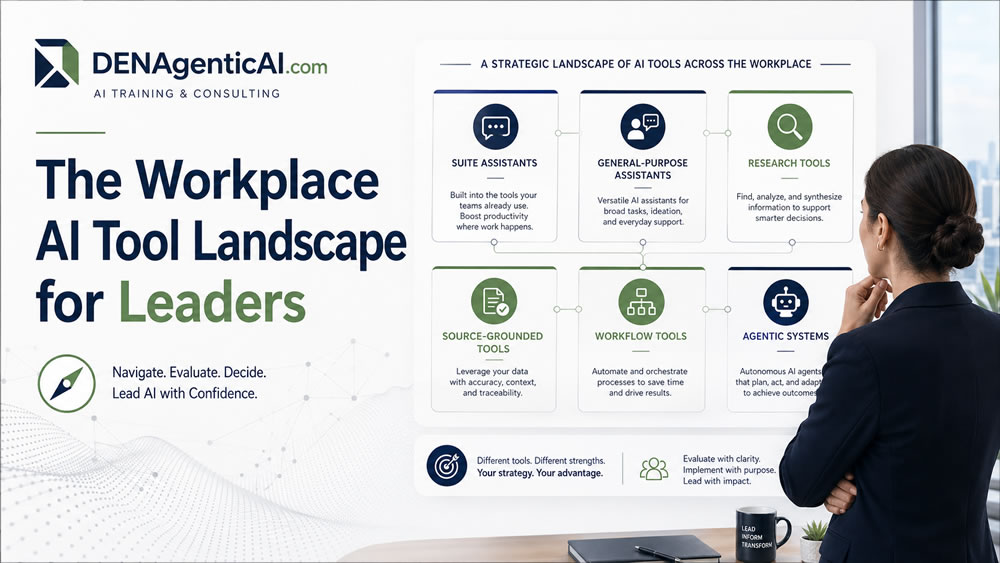
Category 1: Suite-Embedded AI Assistants
Suite-embedded AI tools are built into the productivity environments people already use every day. Examples include Microsoft 365 Copilot and Google Workspace with Gemini. These tools support tasks such as email drafting, document summarization, meeting recaps, presentation creation, spreadsheet support, and collaboration. Their main advantage is workflow proximity. They live where the work already happens.
For many organizations, these tools are the first major workplace AI experience. They can create value quickly because employees do not need to move to a separate platform. A manager can summarize an email thread, rewrite a document, generate meeting notes, or create a slide outline inside familiar software.
However, leaders should not assume that suite-embedded AI automatically creates value. Value depends on document quality, permission settings, training, use-case clarity, and adoption habits. If files are disorganized, meeting notes are poor, or employees do not know how to prompt, the tool may produce uneven results. Leadership question: Where can embedded AI improve daily productivity without creating high risk?
Category 2: General-Purpose Work Assistants
General-purpose assistants include tools such as ChatGPT and Claude. These tools are flexible and can support many forms of knowledge work: drafting, brainstorming, rewriting, summarization, structured comparison, planning, role-play, and executive communication support. Their strength is versatility. They are not tied to one work suite or one narrow use case. A professional can use them to prepare a memo, summarize notes, create a checklist, compare vendors, write a policy draft, or develop a learning plan.
Their flexibility also creates risk. Users may paste sensitive information into unapproved tools. They may accept unsupported claims. They may use the tool for tasks beyond its reliability. Leaders need clear acceptable-use guidance, training, and review standards.
Leadership question: Which professional tasks benefit from flexible AI assistance, and what boundaries should employees follow?
Category 3: Source-Grounded Knowledge and Synthesis Tools
Source-grounded tools are designed to work from selected documents or sources. NotebookLM is one example. Enterprise knowledge assistants and internal document-based systems also fall into this category. These tools are useful when the goal is not freeform generation but evidence-based synthesis. They can help with policy review, report synthesis, reading-pack summaries, briefing notes, internal Q&A, and document comparison.
This category matters because many business tasks require grounding. A leader does not only want a plausible answer. They want an answer based on approved documents, current policies, trusted reports, or validated knowledge. Source-grounded tools can improve trust, but they still depend on document quality. If the source material is outdated, contradictory, incomplete, or poorly organized, the AI output will reflect those problems.
Leadership question: Which business questions require answers grounded in trusted sources rather than generic AI knowledge?
Category 4: Public Research Acceleration Tools
Public research tools help users explore information available on the web. Perplexity and web-grounded assistants are examples. These tools can support market scanning, competitor research, topic exploration, source discovery, trend monitoring, and quick public briefings. They are especially useful for consultants, strategy teams, analysts, marketers, and leaders who need faster external awareness.
The advantage is speed. The risk is over-reliance. Public research tools can surface sources quickly, but users still need to evaluate credibility, timeliness, bias, and relevance. Leaders should encourage verification, especially when research supports investment, strategy, public communication, or policy decisions.
Leadership question: Where can public AI research accelerate learning without replacing source evaluation?
Category 5: Workflow and Automation Tools With AI Components
Workflow tools combine AI capability with process logic. They may classify documents, route requests, extract information, trigger notifications, update records, or support approvals. Examples may involve platforms such as Zapier, Make, n8n, Copilot Studio, or enterprise workflow systems with AI features.
This category is different from drafting and summarizing. It affects how work moves through the organization. A workflow AI system may help triage customer requests, classify invoices, route HR questions, escalate support cases, or generate follow-up tasks. The value can be significant because it reduces manual handoffs. But the risk is also higher because workflow systems can affect customers, employees, compliance, and operations.
Leadership question: Which workflows are repetitive enough for AI support, and where must human approval remain?
Category 6: Emerging Agentic Systems
Agentic systems coordinate multi-step work. They may plan actions, retrieve information, call tools, update outputs, use APIs, collaborate with other agents, or support increasingly autonomous execution.
Agents are not just chatbots. A chatbot responds. An agent may pursue a goal through steps. For example, an agentic system might gather customer data, review policy rules, draft a response, create a ticket, and escalate exceptions. This category has high potential, but it also requires stronger governance. The more AI can act, the more leaders must define boundaries, permissions, validation, monitoring, fallback processes, and accountability.
Leadership question: Which tasks are suitable for agentic coordination, and what safeguards are required before giving AI more autonomy?
A Practical Leadership Map
Leaders can think of workplace AI in three layers.
Layer one is productivity AI: tools that help people write, summarize, meet, research, and communicate.
Layer two is grounded organizational AI: systems that work with internal documents, data, policies, and trusted knowledge.
Layer three is operational and workflow AI: systems that help move work through processes and coordinate tasks.
Agentic AI sits most naturally in the third layer, but it depends heavily on the first two. Without trained people and trusted knowledge, agentic workflows can automate confusion.
How Leaders Should Evaluate AI Tool Requests
When a department requests an AI tool, leaders should ask:
- What task or workflow is being improved?
- Is the use case about productivity, knowledge, research, automation, or agency?
- What data or documents will the tool access?
- What risks exist around privacy, accuracy, bias, compliance, or customer impact?
- What human review is required?
- What success metric will prove value?
- Is this a pilot, a standard tool, or part of a broader AI portfolio?
These questions shift leadership from reactive approval to strategic evaluation.
Final Thought
The workplace AI landscape is easier to manage when leaders stop comparing only tool names and start comparing capability categories. Suite assistants, general-purpose assistants, source-grounded tools, research tools, workflow automation tools, and agentic systems all serve different purposes. They create different value. They require different governance. The leader’s role is not to chase every tool. The leader’s role is to connect the right AI capability to the right work, with the right safeguards. That is how organizations move from AI experimentation to responsible AI adoption.

