Many people begin their AI learning journey by asking the same question: “Which AI tool should I use?”
It is an understandable question. The market is crowded with tools such as ChatGPT, Claude, Microsoft Copilot, Google Gemini, NotebookLM, Perplexity, automation platforms, and emerging agentic AI systems. Each tool promises productivity, better writing, smarter research, faster analysis, or business transformation. For a beginner, a professional, or a leader, it can feel as if learning AI means learning every tool.
But that is not the best way to learn AI. A more practical starting point is this: start with the task, not the tool.
Most people do not wake up thinking, “I need a large language model today.” They think, “I need to write a better email,” “I need to summarize a report,” “I need to prepare for a meeting,” “I need to compare options,” “I need to analyze customer feedback,” or “I need to reduce repetitive work.” These are task problems before they are tool problems.
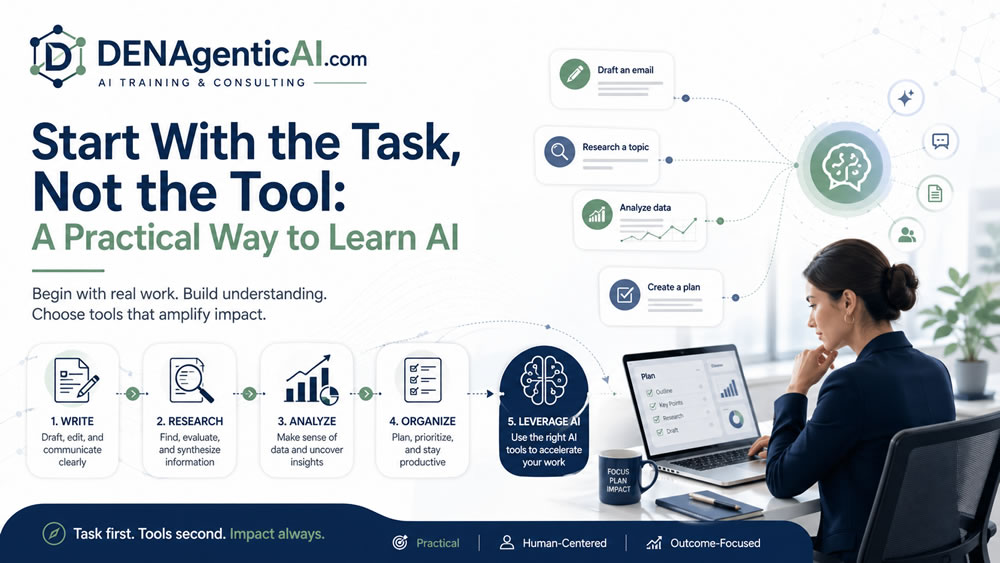
At DENAgenticAI, this is the foundation of our training philosophy. We teach AI from the work perspective first. The sequence is simple: understand the task, identify the skill, select the tool, review the output, and apply human judgment.
Why Tool-First Learning Creates Confusion
Tool-first learning often creates short-term excitement but weak long-term capability. A learner may watch a demo of ChatGPT and try a few prompts. They may see Copilot summarize an email thread. They may ask Perplexity to research a topic. They may upload a document to NotebookLM. These experiences are useful, but they can also create a fragmented understanding.
The learner may know the names of tools without knowing when to use them. They may believe one tool should handle everything. They may blame the tool when the real issue is unclear instructions, missing context, or poor review. They may jump from product to product without developing transferable skills.
AI tools will change. Features will change. Pricing will change. Product names will change. But the core work skills remain more stable: asking clear questions, giving context, summarizing information, comparing options, evaluating output, protecting privacy, and deciding when AI should or should not be used. That is why task-first learning is more durable than tool-first learning.
The Task-First AI Learning Model
A practical AI learning model has five steps:
- Define the task.
- Clarify the desired output.
- Choose the AI skill required.
- Select the tool that fits the task.
- Review and refine the result.
This model works for individuals, professionals, teams, leaders, and organizations.
Step 1: Define the Task
The first question is not “Which tool should I use?” The first question is “What work am I trying to improve?”
Common AI-supported tasks include writing, summarizing, researching, planning, brainstorming, comparing, analyzing, communicating, organizing, classifying, and automating. Each task has a different pattern. Writing a client email is not the same as researching a market. Summarizing a meeting is not the same as analyzing business data. Creating a workflow is not the same as drafting a social media post. When the task is unclear, the AI output becomes generic.
A vague request such as “Help me with this report” may produce something polished but not useful. A clearer task statement, such as “Turn these notes into a two-page report for a senior manager, with findings, risks, and recommendations,” gives the AI a better direction.
Step 2: Clarify the Desired Output
AI performs better when you define the output you want. Do you need bullet points, a one-page memo, a table, a checklist, a presentation outline, a meeting summary, a decision matrix, or a draft email?
For example, “Summarize this document” is weaker than “Summarize this document in five bullet points for a busy operations manager, then list three risks and two recommended next steps.” The second prompt is not just longer. It is clearer. It defines the audience, structure, and purpose of the output.
Step 3: Choose the AI Skill Required
Different tasks require different AI skills.
For writing, you need prompting, tone control, audience framing, and editing. For research, you need source discovery, source comparison, synthesis, and verification. For professional productivity, you need summarization, organization, drafting, and follow-up. For leadership work, you need issue framing, option comparison, risk assessment, and decision support. For workflow automation, you need process mapping, trigger identification, exception handling, and human review design.
When learners understand the skill, they become less dependent on one specific tool. They can transfer the same skill across ChatGPT, Claude, Copilot, Gemini, NotebookLM, Perplexity, and other platforms.
Step 4: Select the Tool That Fits the Task
After the task and skill are clear, tool choice becomes easier.
If the task is flexible drafting, brainstorming, outlining, or analysis, ChatGPT or Claude may be useful. If the task lives inside Microsoft Word, Outlook, Excel, PowerPoint, or Teams, Microsoft 365 Copilot may be the better starting point. If the task lives inside Google Docs, Gmail, Sheets, Slides, or Meet, Gemini in Google Workspace may be more relevant. If the task involves source-grounded synthesis from selected documents, NotebookLM may be useful. If the task involves fast public research and source discovery, Perplexity may be helpful. If the task involves routing, classification, notifications, handoffs, and repeatable process logic, automation tools such as Zapier, Make, or n8n may be involved. If the task requires coordinated multi-step work, tool use, retrieval, memory, and oversight, then agentic AI systems may become relevant.
The point is not to memorize tools. The point is to match tools to work.
Step 5: Review and Refine the Result
AI output should not be treated as finished work by default. A practical AI user knows that the first output is often a draft. Review questions include:
- Is the answer accurate?
- Is it complete?
- Is it appropriate for the audience?
- Did it follow the instructions?
- Did it make unsupported claims?
- Does it need sources?
- Does it include sensitive information?
- Does it require human approval?
This review step is where human judgment remains essential. AI can accelerate work, but the user remains responsible for final use.
The Steer, Row, and Upgrade the Engine Metaphor
A helpful way to think about AI use is the metaphor of steering, rowing, or upgrading the engine.
Sometimes AI helps you steer. It helps you think, compare, prioritize, and decide direction. For example, you might ask AI to compare three project options or identify risks in a plan. Sometimes AI helps you row. It helps you do repetitive knowledge work faster. For example, summarizing notes, drafting emails, rewriting content, creating checklists, or preparing meeting recaps. Sometimes AI upgrades the engine. It supports automation and systems that make work move with less manual effort. For example, classifying support tickets, routing requests, creating follow-up tasks, or connecting documents and workflows.
This metaphor helps learners ask: Am I using AI to think better, work faster, or redesign the system? That question is far more useful than simply asking which tool is popular.
Examples of Task-First AI Learning
Imagine a professional who needs to prepare a weekly update. A tool-first approach might be: “Use ChatGPT to write my update.” A task-first approach would be: “I need to turn project notes into a concise weekly update for my manager, including completed work, blockers, next steps, and risks.” The second approach gives the AI a defined job.
Imagine a leader preparing for a vendor meeting. A tool-first approach might be: “Use AI to summarize the proposal.” A task-first approach would be: “Create a one-page executive brief from this vendor proposal. Include expected value, implementation risks, cost concerns, dependencies, and questions we should ask before approval.” That is decision support, not just summarization.
Imagine an operations manager dealing with repetitive customer requests. A tool-first approach might be: “Can we build an AI agent?” A task-first approach would be: “Our team spends too much time reading requests, classifying them, assigning them, and sending status updates. Which parts of this workflow can AI assist, automate, or escalate, and where do humans need to review?” The task-first approach leads to better design, better governance, and better outcomes.
Why This Matters for Organizations
Organizations often fall into tool-first adoption. One department wants a writing assistant. Another wants a research tool. Another wants AI in meetings. Another wants an internal chatbot. Another wants automation. Leadership may respond by asking which vendor to buy.
A better leadership question is: What work are we trying to improve, and what capability class fits that work? This prevents tool sprawl. It improves training design. It supports safer adoption. It also helps organizations distinguish between personal productivity, professional workflows, knowledge systems, automation, and agentic AI.
The practical way to learn AI is not to chase every tool. It is to understand the work. Start with the task. Clarify the output. Learn the skill. Choose the tool. Review the result. Apply judgment. That is how AI becomes useful, not just impressive. DENAgenticAI teaches AI this way because real value does not come from tool excitement. It comes from improving the work people already need to do.

